Mar 15, 2012

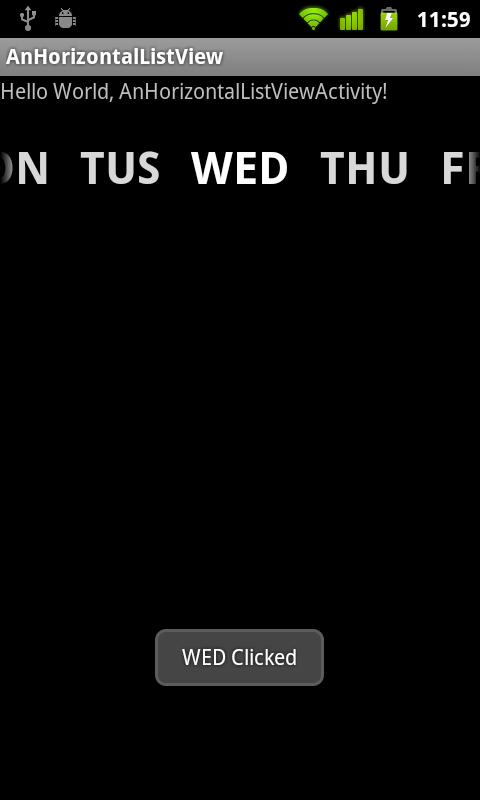
Implement Horizontal ListView using android.widget.Gallery, with custom BaseAdapter.

Refer to the article Implement a photo bar using android.widget.Gallery, with custom BaseAdapter, and custom object. It can be modify to implement a Horizontal ListView, like this:

Our Horizontal ListView

Modify the main java code to implement our custom BaseAdapter for Gallery.
package com.AnHorizontalListView;

import android.app.Activity;
import android.content.Context;
import android.os.Bundle;
import android.view.LayoutInflater;
import android.view.View;
import android.view.ViewGroup;
import android.widget.AdapterView;
import android.widget.AdapterView.OnItemClickListener;
import android.widget.BaseAdapter;
import android.widget.Gallery;
import android.widget.TextView;
import android.widget.Toast;

public class AnHorizontalListViewActivity extends Activity {

Gallery myHorizontalListView;
MyAdapter myAdapter;

/** Called when the activity is first created. */
@Override
public void onCreate(Bundle savedInstanceState) {
super.onCreate(savedInstanceState);
setContentView(R.layout.main);
myHorizontalListView = (Gallery)findViewById(R.id.horizontallistview);

myAdapter = new MyAdapter(this);
myHorizontalListView.setAdapter(myAdapter);

myHorizontalListView.setOnItemClickListener(new OnItemClickListener(){

@Override
public void onItemClick(AdapterView<?> parent, View view, int position,
long id) {
Toast.makeText(
AnHorizontalListViewActivity.this,
parent.getItemAtPosition(position).toString() + " Clicked",
Toast.LENGTH_LONG)
.show();

}});

}

public class MyAdapter extends BaseAdapter {

Context context;

String[] itemsArray = {
"SUN","MON", "TUS", "WED", "THU", "FRI", "SAT"};

MyAdapter(Context c){
context = c;
}

@Override
public int getCount() {
// TODO Auto-generated method stub
return itemsArray.length;
}

@Override
public Object getItem(int position) {
// TODO Auto-generated method stub
return itemsArray[position];
}

@Override
public long getItemId(int position) {
// TODO Auto-generated method stub
return position;
}

@Override
public View getView(int position, View convertView, ViewGroup parent) {
// TODO Auto-generated method stub

View rowView = LayoutInflater
.from(parent.getContext())
.inflate(R.layout.row, null);
TextView listTextView = (TextView)rowView.findViewById(R.id.itemtext);
listTextView.setText(itemsArray[position]);

return rowView;
}


}
}


Create /res/layout/row.xml to define the layout of individual items in Gallery.
<?xml version="1.0" encoding="utf-8"?>
<LinearLayout xmlns:android="http://schemas.android.com/apk/res/android"
android:layout_width="fill_parent"
android:layout_height="fill_parent"
android:orientation="vertical" >

<TextView
android:id="@+id/itemtext"
android:layout_width="wrap_content"
android:layout_height="wrap_content"
android:layout_margin="20dp"
android:textColor="@android:color/white"
android:textStyle="bold"
android:textSize="30sp"/>

</LinearLayout>


Main.xml
<?xml version="1.0" encoding="utf-8"?>
<LinearLayout xmlns:android="http://schemas.android.com/apk/res/android"
android:layout_width="fill_parent"
android:layout_height="fill_parent"
android:orientation="vertical" >

<TextView
android:layout_width="fill_parent"
android:layout_height="wrap_content"
android:text="@string/hello" />
<Gallery
android:id="@+id/horizontallistview"
android:layout_width="fill_parent"
android:layout_height="wrap_content" />

</LinearLayout>


Dual VideoView to play 3gp from YouTube

It's a simple example to include two VideoView in layout to play differnece 3gp from YouTube at the same time.

Reference: A simple example using VideoView to play 3gp from YouTube.

Dual VideoView to play 3gp from YouTube

Main Layout:
<?xml version="1.0" encoding="utf-8"?>
<LinearLayout xmlns:android="http://schemas.android.com/apk/res/android"
android:layout_width="fill_parent"
android:layout_height="fill_parent"
android:orientation="vertical" >

<TextView
android:layout_width="fill_parent"
android:layout_height="wrap_content"
android:text="@string/hello" />
<LinearLayout
android:orientation="vertical"
android:layout_width="fill_parent"
android:layout_height="match_parent">
<VideoView
android:id="@+id/myvideoview"
android:layout_width="fill_parent"
android:layout_height="wrap_content" />
<VideoView
android:id="@+id/myvideoview2"
android:layout_width="fill_parent"
android:layout_height="wrap_content" />
</LinearLayout>
</LinearLayout>


Main Code:
package com.AnVideoView;

import android.app.Activity;
import android.net.Uri;
import android.os.Bundle;
import android.widget.MediaController;
import android.widget.VideoView;

public class AnVideoView extends Activity {

String SrcPath = "rtsp://v5.cache1.c.youtube.com/CjYLENy73wIaLQnhycnrJQ8qmRMYESARFEIJbXYtZ29vZ2xlSARSBXdhdGNoYPj_hYjnq6uUTQw=/0/0/0/video.3gp";
String SrcPath2 = "rtsp://v2.cache7.c.youtube.com/CjYLENy73wIaLQk4RDShYkdS1BMYJCAkFEIJbXYtZ29vZ2xlSARSBXdhdGNoYKjR78WV1ZH5Tgw=/0/0/0/video.3gp";

/** Called when the activity is first created. */
@Override
public void onCreate(Bundle savedInstanceState) {
super.onCreate(savedInstanceState);
setContentView(R.layout.main);
VideoView myVideoView = (VideoView)findViewById(R.id.myvideoview);
myVideoView.setVideoURI(Uri.parse(SrcPath));
myVideoView.setMediaController(new MediaController(this));
myVideoView.requestFocus();
myVideoView.start();

VideoView myVideoView2 = (VideoView)findViewById(R.id.myvideoview2);
myVideoView2.setVideoURI(Uri.parse(SrcPath2));
myVideoView2.setMediaController(new MediaController(this));
myVideoView2.requestFocus();
myVideoView2.start();
}
}


Mar 12, 2012

Create our Android Compass

Base on last post "Detect Orientation using Accelerometer and Magnetic Field sensors", a Android compass is implemented here. In the implementation, the final result (base on Accelerometer and Magnetic Field sensors) is show in RED, point to the north.

our Android Compass

Create a custom View, Compass, extends View. The method update() is called from onSensorChanged() of main activity, with the updated direction.
package com.AndroidDetOrientation;

import android.content.Context;
import android.graphics.Canvas;
import android.graphics.Color;
import android.graphics.Paint;
import android.util.AttributeSet;
import android.view.View;

public class Compass extends View {

private float direction;

public Compass(Context context) {
super(context);
// TODO Auto-generated constructor stub
}

public Compass(Context context, AttributeSet attrs) {
super(context, attrs);
// TODO Auto-generated constructor stub
}

public Compass(Context context, AttributeSet attrs, int defStyle) {
super(context, attrs, defStyle);
// TODO Auto-generated constructor stub
}

@Override
protected void onMeasure(int widthMeasureSpec, int heightMeasureSpec) {
setMeasuredDimension(
MeasureSpec.getSize(widthMeasureSpec),
MeasureSpec.getSize(heightMeasureSpec));
}

@Override
protected void onDraw(Canvas canvas) {

int w = getMeasuredWidth();
int h = getMeasuredHeight();
int r;
if(w > h){
r = h/2;
}else{
r = w/2;
}

Paint paint = new Paint(Paint.ANTI_ALIAS_FLAG);
paint.setStyle(Paint.Style.STROKE);
paint.setStrokeWidth(5);
paint.setColor(Color.WHITE);

canvas.drawCircle(w/2, h/2, r, paint);

paint.setColor(Color.RED);
canvas.drawLine(
w/2,
h/2,
(float)(w/2 + r * Math.sin(-direction)),
(float)(h/2 - r * Math.cos(-direction)),
paint);

}

public void update(float dir){
direction = dir;
invalidate();
}

}


Modify main activity, AndroidDetOrientationActivity, to update Compass.
package com.AndroidDetOrientation;

import android.app.Activity;
import android.hardware.Sensor;
import android.hardware.SensorEvent;
import android.hardware.SensorEventListener;
import android.hardware.SensorManager;
import android.os.Bundle;
import android.widget.TextView;

public class AndroidDetOrientationActivity extends Activity
implements SensorEventListener{

SensorManager sensorManager;
private Sensor sensorAccelerometer;
private Sensor sensorMagneticField;

private float[] valuesAccelerometer;
private float[] valuesMagneticField;

private float[] matrixR;
private float[] matrixI;
private float[] matrixValues;

TextView readingAzimuth, readingPitch, readingRoll;
Compass myCompass;

/** Called when the activity is first created. */
@Override
public void onCreate(Bundle savedInstanceState) {
super.onCreate(savedInstanceState);
setContentView(R.layout.main);
readingAzimuth = (TextView)findViewById(R.id.azimuth);
readingPitch = (TextView)findViewById(R.id.pitch);
readingRoll = (TextView)findViewById(R.id.roll);

myCompass = (Compass)findViewById(R.id.mycompass);

sensorManager = (SensorManager)getSystemService(SENSOR_SERVICE);
sensorAccelerometer = sensorManager.getDefaultSensor(Sensor.TYPE_ACCELEROMETER);
sensorMagneticField = sensorManager.getDefaultSensor(Sensor.TYPE_MAGNETIC_FIELD);

valuesAccelerometer = new float[3];
valuesMagneticField = new float[3];

matrixR = new float[9];
matrixI = new float[9];
matrixValues = new float[3];
}

@Override
protected void onResume() {

sensorManager.registerListener(this,
sensorAccelerometer,
SensorManager.SENSOR_DELAY_NORMAL);
sensorManager.registerListener(this,
sensorMagneticField,
SensorManager.SENSOR_DELAY_NORMAL);
super.onResume();
}

@Override
protected void onPause() {

sensorManager.unregisterListener(this,
sensorAccelerometer);
sensorManager.unregisterListener(this,
sensorMagneticField);
super.onPause();
}

@Override
public void onAccuracyChanged(Sensor arg0, int arg1) {
// TODO Auto-generated method stub

}

@Override
public void onSensorChanged(SensorEvent event) {
// TODO Auto-generated method stub

switch(event.sensor.getType()){
case Sensor.TYPE_ACCELEROMETER:
for(int i =0; i < 3; i++){
valuesAccelerometer[i] = event.values[i];
}
break;
case Sensor.TYPE_MAGNETIC_FIELD:
for(int i =0; i < 3; i++){
valuesMagneticField[i] = event.values[i];
}
break;
}

boolean success = SensorManager.getRotationMatrix(
matrixR,
matrixI,
valuesAccelerometer,
valuesMagneticField);

if(success){
SensorManager.getOrientation(matrixR, matrixValues);

double azimuth = Math.toDegrees(matrixValues[0]);
double pitch = Math.toDegrees(matrixValues[1]);
double roll = Math.toDegrees(matrixValues[2]);

readingAzimuth.setText("Azimuth: " + String.valueOf(azimuth));
readingPitch.setText("Pitch: " + String.valueOf(pitch));
readingRoll.setText("Roll: " + String.valueOf(roll));

myCompass.update(matrixValues[0]);
}

}
}


Modify main.xml to add a View of Compass.
<?xml version="1.0" encoding="utf-8"?>
<LinearLayout xmlns:android="http://schemas.android.com/apk/res/android"
android:layout_width="fill_parent"
android:layout_height="fill_parent"
android:orientation="vertical" >

<TextView
android:layout_width="fill_parent"
android:layout_height="wrap_content"
android:text="@string/hello" />
<TextView
android:id="@+id/azimuth"
android:layout_width="fill_parent"
android:layout_height="wrap_content"/>
<TextView
android:id="@+id/pitch"
android:layout_width="fill_parent"
android:layout_height="wrap_content"/>
<TextView
android:id="@+id/roll"
android:layout_width="fill_parent"
android:layout_height="wrap_content"/>
<view
class="com.AndroidDetOrientation.Compass"
android:id="@+id/mycompass"
android:layout_width="fill_parent"
android:layout_height="fill_parent"/>

</LinearLayout>

Mar 11, 2012

Detect Orientation using Accelerometer and Magnetic Field sensors

The post Detect Android device rotation, using Accelerometer sensor base on accelerometer only. It is another method to obtain it using both Accelerometer and Magnetic Field sensors together.

Example:

Detect Orientation using Accelerometer and Magnetic Field sensors

package com.AndroidDetOrientation;

import android.app.Activity;
import android.hardware.Sensor;
import android.hardware.SensorEvent;
import android.hardware.SensorEventListener;
import android.hardware.SensorManager;
import android.os.Bundle;
import android.widget.TextView;

public class AndroidDetOrientationActivity extends Activity
implements SensorEventListener{

SensorManager sensorManager;
private Sensor sensorAccelerometer;
private Sensor sensorMagneticField;

private float[] valuesAccelerometer;
private float[] valuesMagneticField;

private float[] matrixR;
private float[] matrixI;
private float[] matrixValues;

TextView readingAzimuth, readingPitch, readingRoll;

/** Called when the activity is first created. */
@Override
public void onCreate(Bundle savedInstanceState) {
super.onCreate(savedInstanceState);
setContentView(R.layout.main);
readingAzimuth = (TextView)findViewById(R.id.azimuth);
readingPitch = (TextView)findViewById(R.id.pitch);
readingRoll = (TextView)findViewById(R.id.roll);

sensorManager = (SensorManager)getSystemService(SENSOR_SERVICE);
sensorAccelerometer = sensorManager.getDefaultSensor(Sensor.TYPE_ACCELEROMETER);
sensorMagneticField = sensorManager.getDefaultSensor(Sensor.TYPE_MAGNETIC_FIELD);

valuesAccelerometer = new float[3];
valuesMagneticField = new float[3];

matrixR = new float[9];
matrixI = new float[9];
matrixValues = new float[3];
}

@Override
protected void onResume() {

sensorManager.registerListener(this,
sensorAccelerometer,
SensorManager.SENSOR_DELAY_NORMAL);
sensorManager.registerListener(this,
sensorMagneticField,
SensorManager.SENSOR_DELAY_NORMAL);
super.onResume();
}

@Override
protected void onPause() {

sensorManager.unregisterListener(this,
sensorAccelerometer);
sensorManager.unregisterListener(this,
sensorMagneticField);
super.onPause();
}

@Override
public void onAccuracyChanged(Sensor arg0, int arg1) {
// TODO Auto-generated method stub

}

@Override
public void onSensorChanged(SensorEvent event) {
// TODO Auto-generated method stub

switch(event.sensor.getType()){
case Sensor.TYPE_ACCELEROMETER:
for(int i =0; i < 3; i++){
valuesAccelerometer[i] = event.values[i];
}
break;
case Sensor.TYPE_MAGNETIC_FIELD:
for(int i =0; i < 3; i++){
valuesMagneticField[i] = event.values[i];
}
break;
}

boolean success = SensorManager.getRotationMatrix(
matrixR,
matrixI,
valuesAccelerometer,
valuesMagneticField);

if(success){
SensorManager.getOrientation(matrixR, matrixValues);

double azimuth = Math.toDegrees(matrixValues[0]);
double pitch = Math.toDegrees(matrixValues[1]);
double roll = Math.toDegrees(matrixValues[2]);

readingAzimuth.setText("Azimuth: " + String.valueOf(azimuth));
readingPitch.setText("Pitch: " + String.valueOf(pitch));
readingRoll.setText("Roll: " + String.valueOf(roll));
}

}
}


<?xml version="1.0" encoding="utf-8"?>
<LinearLayout xmlns:android="http://schemas.android.com/apk/res/android"
android:layout_width="fill_parent"
android:layout_height="fill_parent"
android:orientation="vertical" >

<TextView
android:layout_width="fill_parent"
android:layout_height="wrap_content"
android:text="@string/hello" />
<TextView
android:id="@+id/azimuth"
android:layout_width="fill_parent"
android:layout_height="wrap_content"/>
<TextView
android:id="@+id/pitch"
android:layout_width="fill_parent"
android:layout_height="wrap_content"/>
<TextView
android:id="@+id/roll"
android:layout_width="fill_parent"
android:layout_height="wrap_content"/>

</LinearLayout>


Next
- Create our Android Compass

Mar 7, 2012

SurfaceView Game step-by-step: react device movement/orientation using accelerometer

With the help of accelerometer on Android device(Get detail info of Accelerometer), we can react device movement/orientation for our SurfaceView Game(Implement onTouchEvent() to handle user touch on SurfaceView). After finished, the the Sprite will move once user move the device.

SurfaceView Game step-by-step: react device movement/orientation using accelerometer
Implement new class - MyAccelerometer.java.
package com.MyGame;

import android.content.Context;
import android.hardware.Sensor;
import android.hardware.SensorEvent;
import android.hardware.SensorEventListener;
import android.hardware.SensorManager;

public class MyAccelerometer implements SensorEventListener{

private SensorManager sensorManager;
private Sensor sensorAccelerometer;
private MyGameActivity parent;

private float maximumRange;

public MyAccelerometer(Context c) {
parent = (MyGameActivity)c;
}

void registerListener(){
sensorManager = (SensorManager)parent.getSystemService(Context.SENSOR_SERVICE);
sensorAccelerometer = sensorManager.getDefaultSensor(
Sensor.TYPE_ACCELEROMETER);

maximumRange = sensorAccelerometer.getMaximumRange();

sensorManager.registerListener(this,
sensorAccelerometer,
SensorManager.SENSOR_DELAY_NORMAL);
}

void unregisterListener(){
sensorManager.unregisterListener(this);
}

@Override
public void onAccuracyChanged(Sensor sensor, int accuracy) {
// TODO Auto-generated method stub

}

@Override
public void onSensorChanged(SensorEvent event) {
// TODO Auto-generated method stub
/*
* event.values[0]: azimuth, rotation around the Z axis.
* event.values[1]: pitch, rotation around the X axis.
* event.values[2]: roll, rotation around the Y axis.
*/

float valueAzimuth = event.values[0];
float valuePitch = event.values[1];

parent.updateAccelerometer(
valueAzimuth/maximumRange, -valuePitch/maximumRange);

}

}


Modify MyGameActivity.java to instance MyAccelerometer object in onCreate(), init it in onResume(), unregisterListener it in onPause(), and also implement updateAccelerometer().
package com.MyGame;

import android.app.Activity;
import android.graphics.PixelFormat;
import android.os.Bundle;

public class MyGameActivity extends Activity {

MyGameSurfaceView myGameSurfaceView1;
MyForeground myForeground;

MyAccelerometer myAccelerometer;

/** Called when the activity is first created. */
@Override
public void onCreate(Bundle savedInstanceState) {
super.onCreate(savedInstanceState);
setContentView(R.layout.main);
myGameSurfaceView1 = (MyGameSurfaceView)findViewById(R.id.myview1);
myForeground = (MyForeground)findViewById(R.id.myforeground);

//Set myForeground using transparent background
myForeground.setZOrderOnTop(true);
myForeground.getHolder().setFormat(PixelFormat.TRANSPARENT);

myAccelerometer = new MyAccelerometer(this);

}

@Override
protected void onResume() {
// TODO Auto-generated method stub
super.onResume();
myGameSurfaceView1.MyGameSurfaceView_OnResume();
myForeground.MyGameSurfaceView_OnResume();

myAccelerometer.registerListener();

}

@Override
protected void onPause() {
// TODO Auto-generated method stub
super.onPause();
myGameSurfaceView1.MyGameSurfaceView_OnPause();
myForeground.MyGameSurfaceView_OnPause();

myAccelerometer.unregisterListener();
}

void updateAccelerometer(float tx, float ty){
int w = myForeground.getWidth();
int h = myForeground.getHeight();

float x = ((w/2) * tx) + (w/2);
float y = ((h/2) * ty) + (h/2);
myForeground.updateAccelerometer(x, y);
}

}


Update MyForeground.java.
package com.MyGame;

import android.content.Context;
import android.graphics.BitmapFactory;
import android.graphics.Canvas;
import android.graphics.Color;
import android.graphics.PorterDuff.Mode;
import android.util.AttributeSet;

public class MyForeground extends MyGameSurfaceView {

Sprite mySprite;

public MyForeground(Context context) {
super(context);
init();
}

public MyForeground(Context context, AttributeSet attrs) {
super(context, attrs);
init();
}

public MyForeground(Context context, AttributeSet attrs, int defStyle) {
super(context, attrs, defStyle);
init();
}

private void init(){
mySprite = new Sprite(
BitmapFactory.decodeResource(getResources(), R.drawable.icon_me),
100, 100);
}

@Override
protected void onDraw(Canvas canvas) {
//Clear Canvas with transparent background
canvas.drawColor(Color.TRANSPARENT, Mode.CLEAR);

mySprite.draw(canvas);
}

@Override
public void updateStates() {
// TODO Auto-generated method stub
mySprite.update();
}

void updateAccelerometer(float tx, float ty){
mySprite.setX((int)tx);
mySprite.setY((int)ty);
}

}


Update Sprite.java to remove un-used code.
package com.MyGame;

import android.graphics.Bitmap;
import android.graphics.Canvas;

public class Sprite {
private Bitmap bitmap;
private int x;
private int y;
float bitmap_halfWidth, bitmap_halfHeight;

public Sprite(Bitmap bm, int tx, int ty){
bitmap = bm;
x = tx;
y = ty;
bitmap_halfWidth = bitmap.getWidth()/2;
bitmap_halfHeight = bitmap.getHeight()/2;
}

public void setX(int tx){
x = tx;
}

public void setY(int ty){
y = ty;
}

public int getX(){
return x;
}

public int getY(){
return y;
}

public void draw(Canvas canvas){
canvas.drawBitmap(bitmap, x-bitmap_halfWidth, y-bitmap_halfHeight, null);
}

public void update(){

}

}


The code can be download here: https://sites.google.com/site/helloandroidingcoding/download/MyGame_20120307.zip?attredirects=0&d=1

Infolinks In Text Ads